Save, search and export your AI chats
An AI chat that finally got somewhere. Close the tab and it becomes a scroll you will never find again. Threadkeep keeps it in a library you can search, or saves it to a file on your own computer.
Save, search and export your AI chats as Markdown, text, JSON, PDF or Word. Version 2.0 is on Firefox for ChatGPT, Claude, Gemini™ and DeepSeek; the Chrome update is in review. Everything stays in your browser.
Free on FirefoxFree on ChromeStays in your browser
Add to Firefox, free Add to Chrome, free Ask a question
Threadkeep 2.0.0 is on Firefox Add-ons, free to install: addons.mozilla.org/firefox/addon/threadkeep-deepseek. Mozilla approved it on 24 November 2026. Version 2.0 keeps the AI chats you want in a library inside your browser, and saves any of them as a file. For use with ChatGPT, Claude, Gemini™ (and Gemini Notebook™, formerly known as NotebookLM™) and DeepSeek.
On the Chrome Web Store, Threadkeep 1.2.0 is free to install today: chromewebstore.google.com/detail/threadkeep-chat-exporter. The Chrome update to 2.0.0 is in Chrome Web Store review, and Chrome installs it by itself when it is approved.
See it working
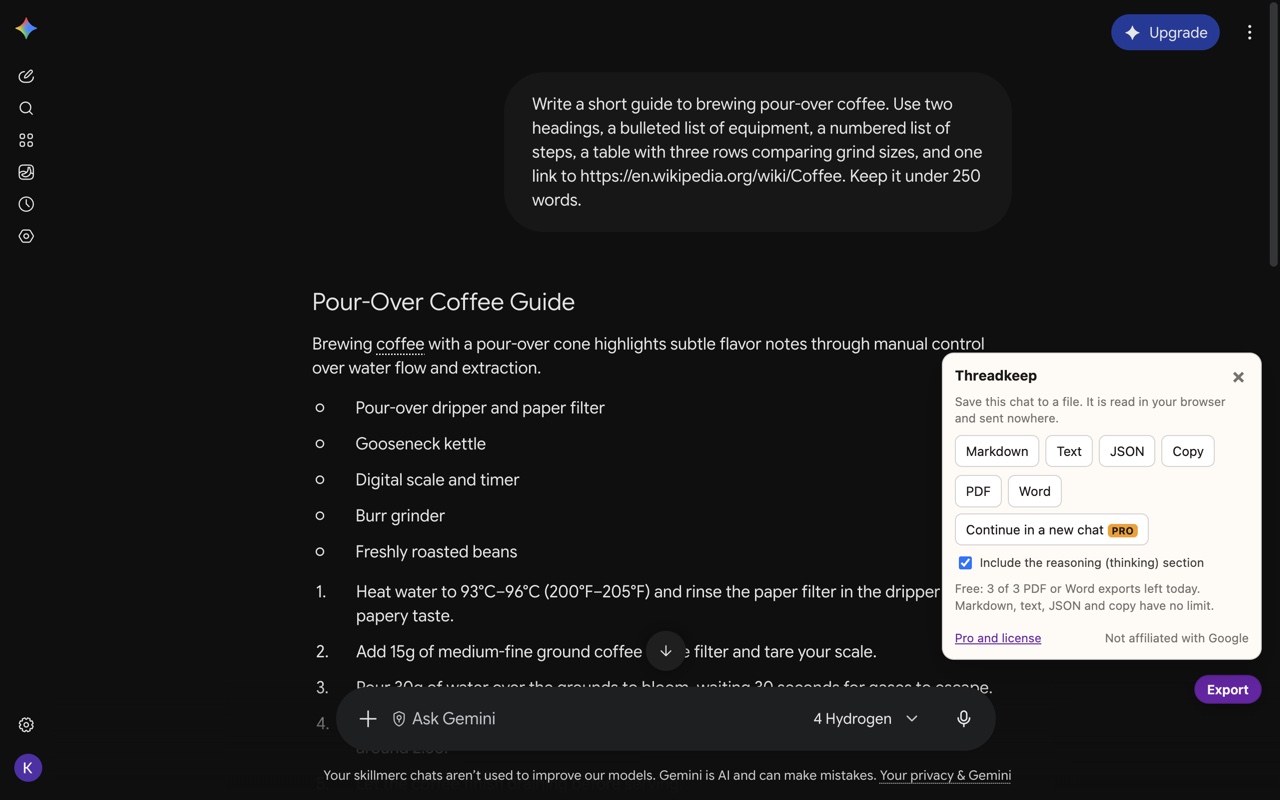
What it does
Threadkeep is a browser extension by SKILLMERC. It saves the AI conversation you have open in your tab to a library in your browser or to a file on your own computer.
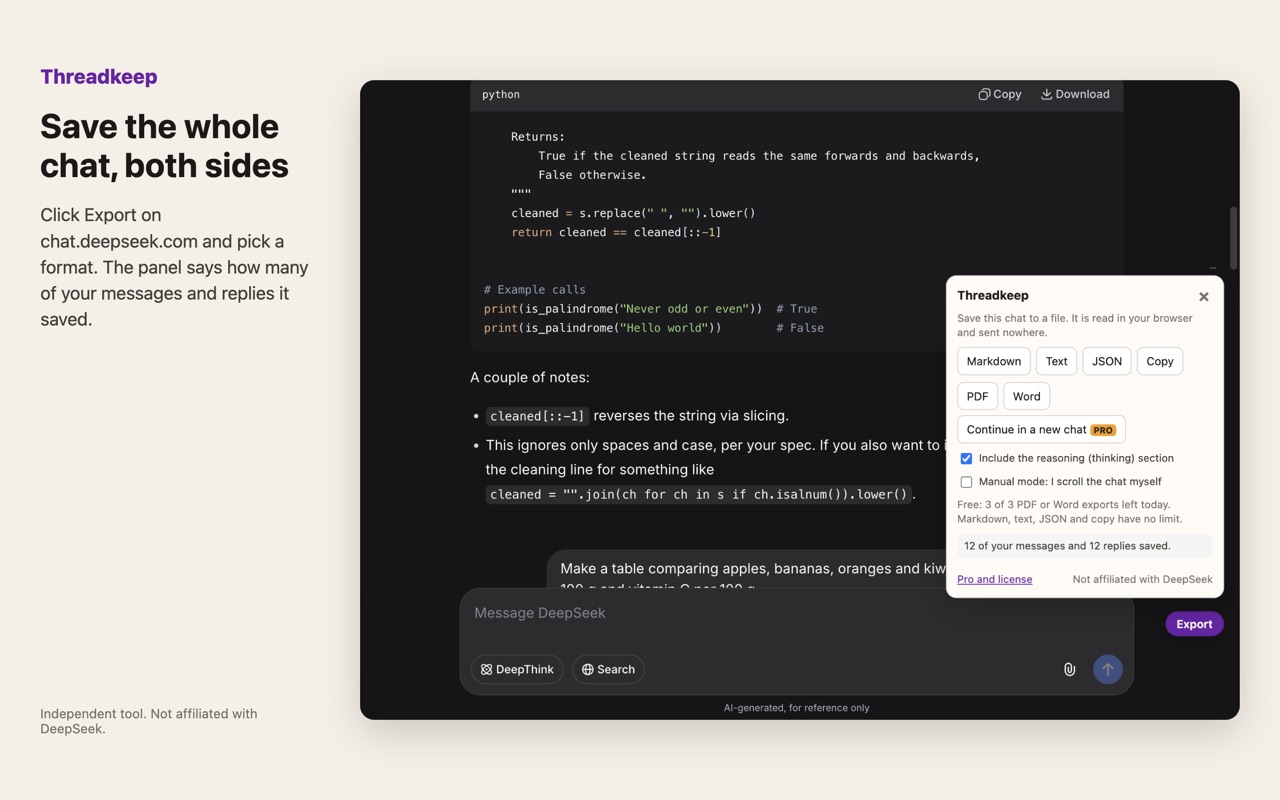
Open a conversation and click the Export button on the page, or the toolbar button. The first time, a short notice says what is read. Nothing is read until you click "I agree".
Press "Save to library" to keep a copy. Save the same conversation again later and the copy is updated. Or pick a format and save it to your computer straight away: Markdown, plain text, JSON, PDF, Word, or copy to the clipboard.
The library (version 2.0):
- Search the text of everything you saved. Results show a short snippet, and you can filter by site.
- Folders, pins and tags. Sort conversations into folders, with one level of subfolders. Pin the ones you use most. Add tags and filter by tag.
- Open the original conversation on its site with one click.
- Back up and restore. Back up the whole library to one file and restore it later. A restore adds the chats that are new, replaces a chat you already have with its copy in the file, and keeps every other saved chat.
The export:
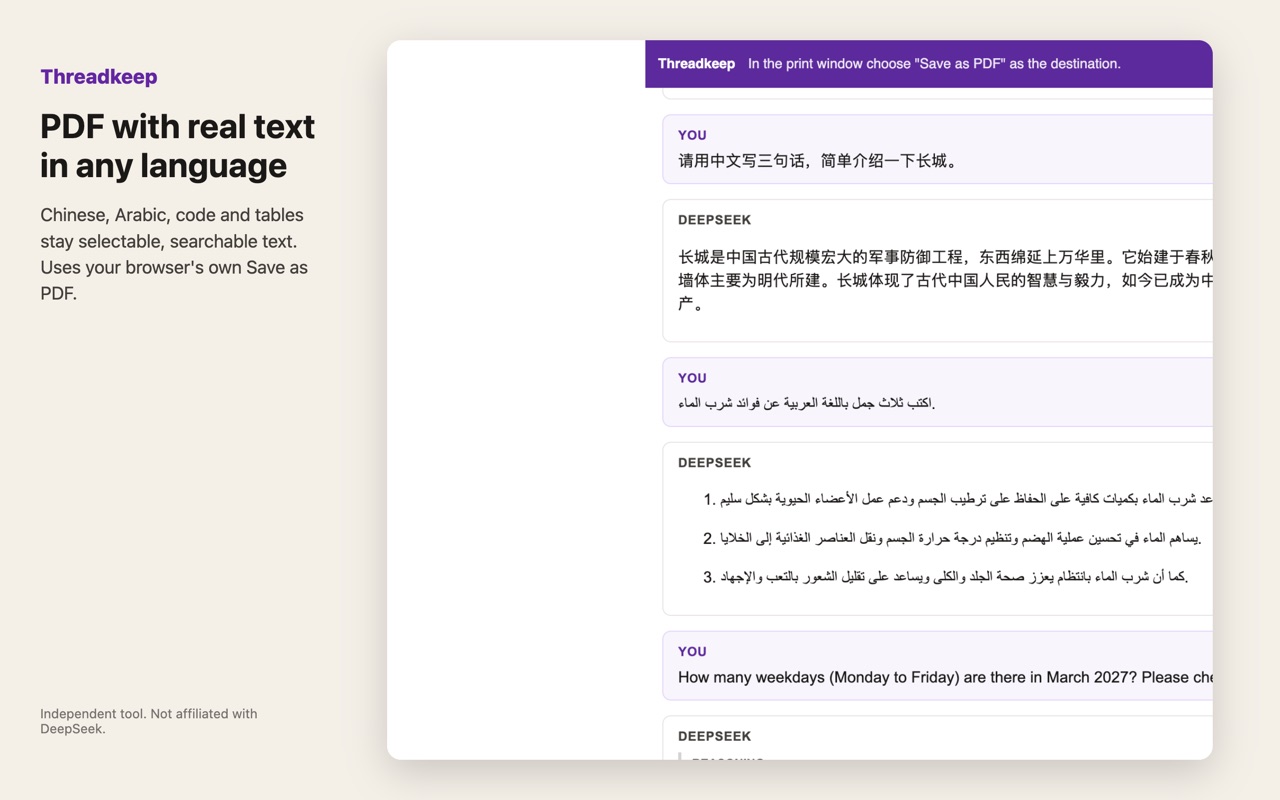
- Real text in PDFs. PDF goes through your browser's own "Save as PDF", so the text can be selected and searched. Word too (an HTML .doc file that Word opens, not a .docx).
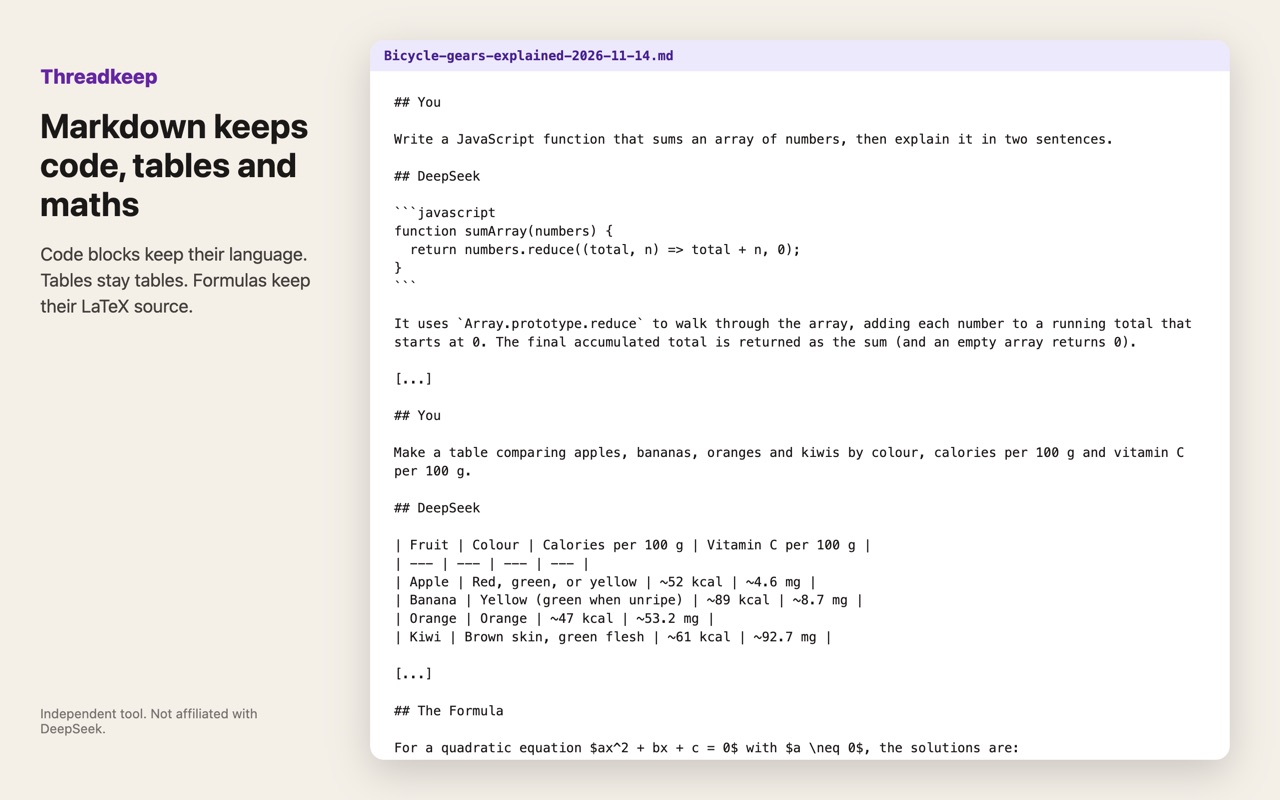
- Code, tables and links. Code blocks keep their indentation, tables stay tables, lists and links stay. On DeepSeek, maths keeps its LaTeX and the reasoning section can be included or left out.
- Both sides. The panel says how many of your messages and replies it saved. If a site has changed its page and something may be missing, it tells you. On very long conversations, check that count.
What stays on your device: everything
Conversations are read in your browser. Saved ones stay in your browser and files go to your computer. Nothing is sent to us or to anyone else. We run no server that could receive them. No account, no analytics, no ads, no tracking.
It reads only the conversation you have open, when you open its panel, export or save. It does not use your login to fetch anything in the background.
Firefox 2.0.0 works on chat.deepseek.com, gemini.google.com and notebook.google.com, and on chatgpt.com and claude.ai only after you allow them. The Chrome version on the store today (1.2.0) works only on chat.deepseek.com, gemini.google.com and notebook.google.com. Neither asks for access to any other site.
One thing is sent, and only if you buy Pro and activate a license key: the key and a random ID for this browser go to Freemius, our payment and licensing provider, to check the license (on activation also the extension version, and the browser and system name; in Firefox only if you allow technical data). Firefox asks for your permission first. Nothing about your chats is included.
Removing the extension deletes your library from the browser. Back it up first if you want to keep it.
Full details: Threadkeep privacy policy.
Free and Pro
In version 2.0:
| Free | Pro | |
|---|---|---|
| Saved conversations | 100 | No limit |
| Folders (subfolders included) and tags | 5 folders, 5 different tags | No limit |
| Search | Every result | Every result |
| Markdown, plain text, JSON, copy | No limit | No limit |
| PDF and Word | 3 exports a day | No limit |
| ZIP export of a folder or a search result: one Markdown file per conversation, plus an index | No | Yes |
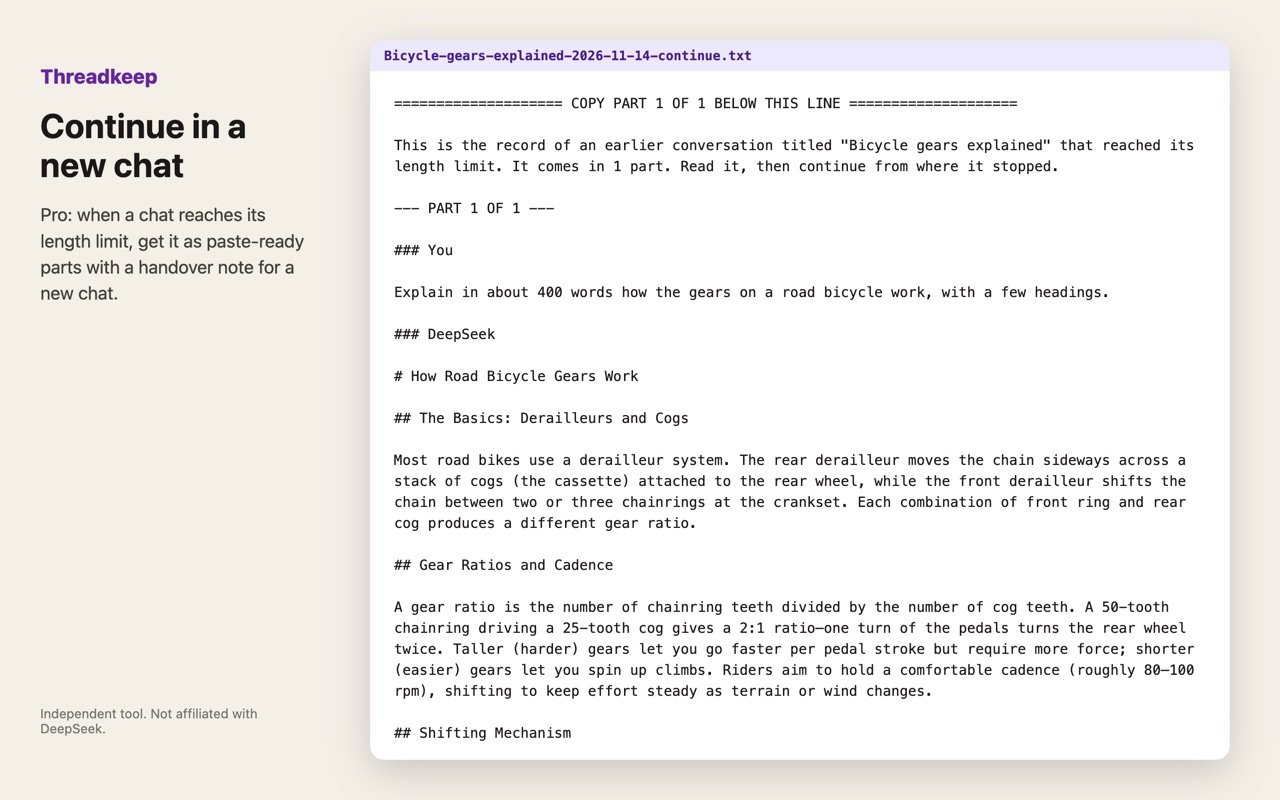
| "Continue in a new chat": the chat split into paste-ready parts with a handover note | No | Yes |
Pro price: USD 4.99 a month, USD 29 a year, or USD 59 once, for one browser. One license works on every supported site. Payment and licensing are handled by Freemius, and the checkout shows the total before you pay. Refund within 14 days of purchase, no questions asked. Renewal payments are not refunded. You get Pro from the extension's settings page ("Pro and license" in the panel). Chrome 1.2.0 has no library yet; its Pro removes the PDF and Word limit and adds "Continue in a new chat". If a purchase or a license key does not work, email us and we will put it right.
Have a deal code? Redeem it here.
Browsers
Firefox: available on Firefox Add-ons (version 2.0.0, approved 24 November 2026): Add to Firefox, free.
Chrome: available on the Chrome Web Store (version 1.2.0, published 21 November 2026): Add to Chrome, free. Version 2.0.0 is in Chrome Web Store review.
Which sites each version works on today:
- Firefox 2.0.0: DeepSeek (chat.deepseek.com), Gemini (gemini.google.com) and Gemini Notebook (notebook.google.com). ChatGPT (chatgpt.com) and Claude (claude.ai) on request: it asks for nothing at install, and works there after you click its toolbar button on that tab, or after you allow the site in its settings. You can turn each of the two off again.
- Chrome 1.2.0: DeepSeek (chat.deepseek.com), Gemini (gemini.google.com) and Gemini Notebook (notebook.google.com).
Not saved in 2.0: pictures (a picture stays as a short line, or as a link in Markdown), uploaded files, and the content of Claude artifacts (a title line is kept). In a notebook, only the chat is read, not your sources or notes. In Chrome 1.2.0, not saved: pictures (a picture inside a reply is kept as a link in Markdown only), uploaded files, Canvas documents and Deep Research reports. On Gemini and in Gemini Notebook, maths and the reasoning ("thinking") section are not supported in Chrome 1.2.0.
Guides: skillmerc.com/threadkeep/help.
Support
Email kyle@skillmerc.com. A person reads it.
Not affiliated with OpenAI, Anthropic, Google or DeepSeek
Threadkeep is an independent tool by SKILLMERC (PTY) LTD. It is not made by, endorsed by or affiliated with OpenAI, Anthropic, Google or DeepSeek. ChatGPT is a trademark of OpenAI. Claude is a trademark of Anthropic, PBC. DeepSeek is a trademark of its owner. Gemini, Gemini Notebook and NotebookLM are trademarks of Google LLC. Use of these trademarks is subject to Google Permissions.